HIGH SAFETY STANDARDS
Where I stop, every time.
Here is where the app draws its lines. By default Ethan asks before it sends or calls, and is designed to stop before paying, booking or permanently deleting. This page also covers what happens to your data.
The red lines
These are the lines the app shows you before you switch Ethan on. The core of the safest limits is built into the app, and Ethan is designed to stop at these points and hand the phone back to you.
Never, even if you ask
Change critical settings on your phone
Like a factory reset or removing an account. Your phone stays the way you left it.
Touch your passwords, PINs or OTPs
Ethan skips password boxes and one-time codes, and it does not photograph a screen that has a password field on it. Those stay between you and your phone.
Never without your explicit approval
Book or reserve
A ride, ticket or trip, only after you say go ahead.
Purchase or make a payment
Pay, buy, transfer money or place an order, only after you say go ahead.
Delete content
Only when you ask me to remove something, directly.
By default. Ethan asks before it sends a message or makes a call. It does everything up to a payment, a booking or a permanent delete, then hands the phone back to you. A delete that only moves an item to a bin you can restore it from may go ahead, because it can be undone. Factory reset, deleting an account, signing out and a permanent delete always ask you to confirm. In Settings, under Agent, then Autonomy, you can let Ethan press Send or Call itself when it is sure of the contact. Even then it is designed to stop before paying.
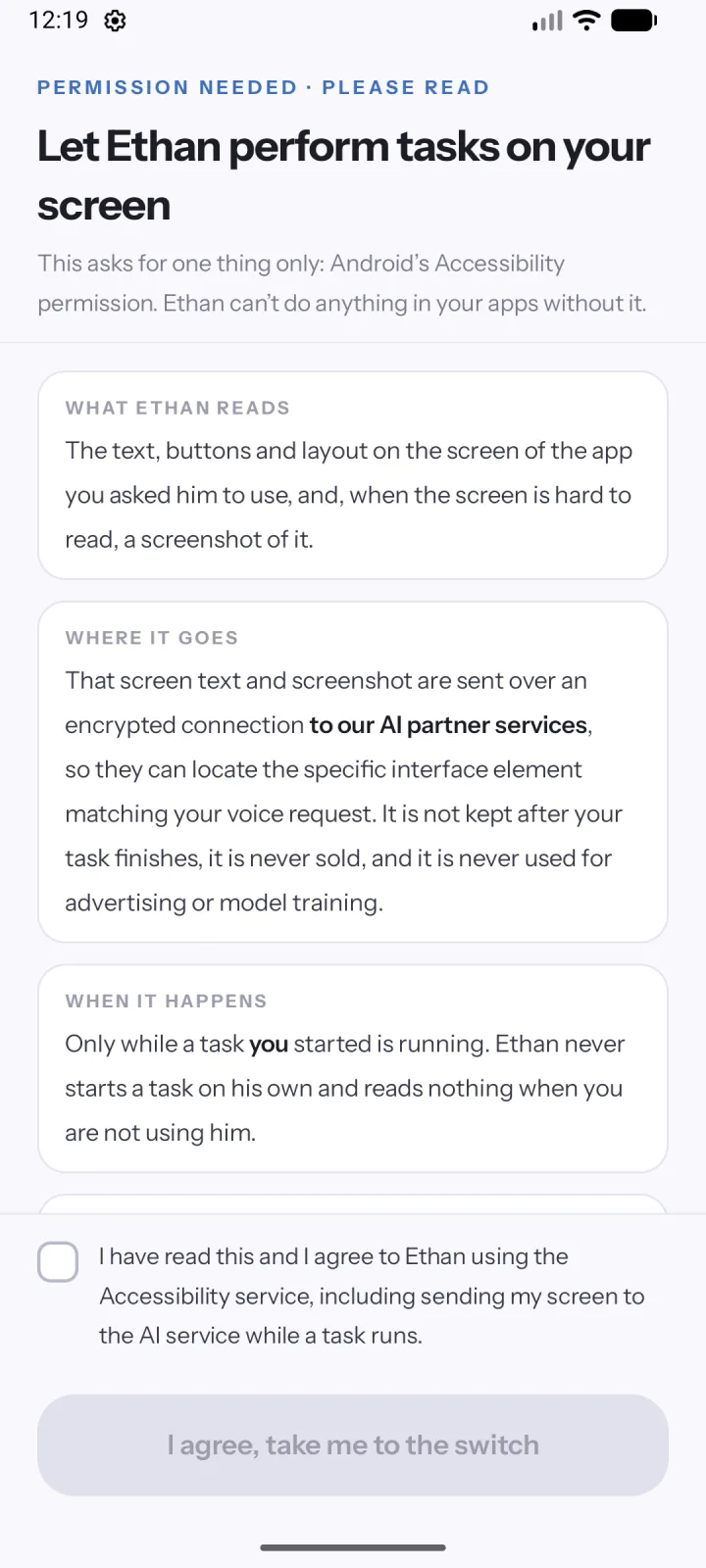
THE ACCESSIBILITY PERMISSION
One permission, explained before you grant it.
Ethan asks for Android’s Accessibility permission, and the app explains it in plain words before you switch it on.
What Ethan reads.
The text, buttons and layout of the app you asked it to use, and a screenshot when the screen is hard to read.
When it happens.
Only while a task you started is running. Ethan never starts a task on its own and reads nothing when you are not using it.
How to take it back.
Switch Agent Ethan off in Android Settings, then Accessibility, at any time.
YOUR DATA
What is processed, and what is kept.
Screen text and screenshots
Sent over an encrypted connection to Google Gemini through Neural Forge’s server in India (Google Cloud, asia-south1), only during an active task, to work out the next step. The privacy policy explains what is kept and for how long.
Voice
Processed to turn your spoken task into text. The privacy policy explains where this happens and what is kept.
Task history
A short summary of what was asked and done, used so a follow-up can continue. You can clear it in the app.
Diagnostics and Help improve
The app has diagnostics and a “Help improve Agent Ethan” setting, found in Settings under Privacy. Read the privacy policy for what is kept and for how long.
Your account
Your email address and a daily usage count, handled with Google Firebase.
No ads
No advertising ID, and no selling or renting of your data.
The full details, including who we share data with and how long minimal operational logs are kept, are in the privacy policy. To remove your account, see delete account. For the reasoning behind the stops, read why Ethan stops before you pay or delete, and for what the permission allows, what the Android accessibility permission allows.
GET STARTED
Ready when you are.
Agent Ethan is free to start, with a daily allowance of assisted tasks. It needs Android 11 or newer.