Is Agent Ethan Safe? Privacy Explained
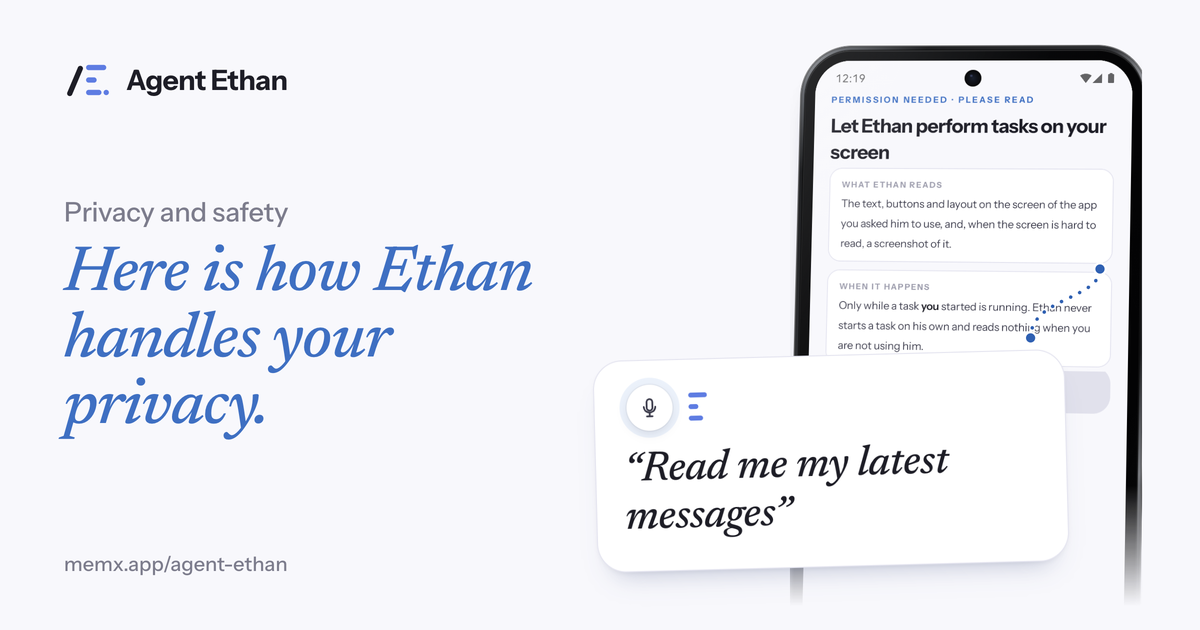
Agent Ethan reads the screen of the app you point it at, only during a task you started, and sends screen content and screenshots to an AI service to work out the next step, only while that task runs. That is the core of it. The app also does a few other things that matter for privacy: it has diagnostics and a Help improve Agent Ethan setting, it keeps a task history list, and it has a learned memory. This post explains each in plain words, and it says plainly that the published privacy policy is the legal reference. Please read the policy yourself, and treat this post as a guide to the questions worth asking, not a replacement.
Why an accessibility tool needs to read your screen
Agent Ethan works by operating other apps for you, and to do that it has to see them. It runs as an Android Accessibility Service, which you switch on yourself in Android Settings. Android's developer documentation describes the core idea: accessibility services can perform actions, such as clicking buttons or scrolling lists, on behalf of the user. That is also why it is a permission worth reading carefully.
With your explicit permission, the privacy policy says the service reads the content of the screen of the app you asked it to operate: text, the structure of the screen, and a screenshot when text alone is not enough. It then performs the taps, typing and scrolling needed for your task.
The permission screen in the app says the same thing in plain language, under the headings what Ethan reads, where it goes, and when it happens. The policy page is the legal reference, so read it alongside this post.
When Ethan is reading, and when it is not
The policy is specific on timing. The service does this only while a task you started is running. Agent Ethan never starts a task on its own and does nothing when you are not actively using it. The listing repeats the point: Ethan never starts anything on its own.
You can see it working. A small pill stays on top of the screen with Pause and Stop, a hollow gold ring marks what Ethan is about to press, and you can end the task at any moment. You can also turn the service off whenever you like in Android Settings, under Accessibility. Once it is off, the terms say the app cannot operate other apps.
Where your data goes
Several things leave the phone, and it helps to take them one at a time: the screen, your voice, the app's diagnostics, and your account.
The policy adds that processing takes place in India (Google Cloud, asia-south1) and on Google's infrastructure for the Gemini and Firebase services, and that data in transit is encrypted. It also says plainly that no system is perfectly secure, so treat Ethan as a service with stated limits and not as a promise of perfection.
- Screen content and screenshots go, only while a task you started is running and over an encrypted connection, to the AI provider (Google Gemini) through Neural Forge's server in India.
- Your voice: when you speak a task, the app by default sends the recording to an online speech service (Google Gemini, through Neural Forge's server) to be turned into text. The phone's own recogniser is used as a fallback, for example when you are offline. There is no ordinary setting that keeps speech recognition on the phone, so if that matters to you, type your task instead.
- Diagnostics: Settings, under Privacy, has a switch that sends a redacted log of each finished task to support. It is on by default. The app's own wording says app logs can include what you asked, what was typed and what was on screen, with passwords and one-time codes removed first.
- Your account: sign-in and a daily usage count are handled by Google Firebase.
What is kept, and where to read the details
This is the part where a tidy one-line answer would be misleading, because there is more than one layer. The published privacy policy at /agent-ethan/privacy-policy/ is the legal reference, and it is the text to rely on for what is kept and for how long. If this post and the policy ever seem to differ, go by the policy and write to the contact address in it.
Going by the app's own screens and settings, this is what it does. It keeps a task history list, a short summary of what was asked and done, so you can review what happened, and Settings has a button to clear it. It keeps diagnostics logs, by default, as described above. It has a learned memory, where Ethan remembers small things across tasks such as a name, a preference or how an app behaves, and that memory is synced to Neural Forge's servers rather than staying only on the phone. And it keeps your account details, which include your email address and a daily usage count.
Settings, under Privacy, also has a Help improve Agent Ethan switch, which is on by default. Its own wording says Ethan may use your activity to improve itself. In the app source it does not control learned memory, so do not treat it as a single off switch for everything. This post cannot tell you from the outside exactly how any of this is used or for how long it is kept, which is why the policy matters.
To remove your account and data, open Settings, then About, then Delete account & data in the app. The privacy policy describes what happens to your data. If the exact retention period matters to you, ask Neural Forge at the contact address on the policy.
What Ethan is designed to avoid
On data use, the policy says Neural Forge does not sell or rent your data, shows no advertising and does not use an advertising ID. For anything about profiling or how activity is used to improve the app, read the policy's own wording and compare it with the Help improve Agent Ethan setting described above.
On actions, the policy and the listing say Ethan stops before Pay, Buy, Book, Send money or Delete and hands the phone back to you. In the app, that is the default behaviour, and the Autonomy setting under Settings, then Agent, changes how much it asks before Send or Call. The app's own permission screen says it skips password boxes and one-time codes, and will not change critical settings such as a factory reset or removing an account, even if you ask.
What this does not claim, and how to decide
This post does not say Ethan is end to end encrypted or zero-knowledge, and it does not say that nothing is kept. What it offers is narrower and checkable: a stated purpose and destination for the screen, the settings the app shows you, and a pointer to the policy as the legal reference.
If you use banking, health or private messaging apps, think about the screen being sent for the length of a task, and about the fact that diagnostics logs can include what was on screen. A practical habit is to use Ethan for the tasks that benefit from it, such as alarms, calls and messages, and to close sensitive screens before you start a task.
You can read the whole policy, the terms and the delete-account page on this site. If something is unclear, or you want to ask a question, the contact address in the policy is [email protected].
Frequently asked questions
Does Agent Ethan store my screen or my voice?
Screen content and screenshots go to an AI service only while a task runs, and by default voice recordings go to an online speech service to be turned into text. What is kept afterwards, including diagnostics logs and learned memory, is covered by the privacy policy, so read it at /agent-ethan/privacy-policy/ rather than relying on a summary.
Does Ethan sell my data or show ads?
The policy says Neural Forge does not sell or rent your data, shows no advertising and does not use an advertising ID.
What does Agent Ethan keep about me?
Your email address and a daily usage count for the account, a task history list you can clear in Settings, diagnostics logs that are on by default, and a learned memory that syncs to Neural Forge's servers. The privacy policy is the legal reference for what is kept and for how long.
Is Agent Ethan end to end encrypted?
The policy does not make that claim. It says data in transit is encrypted and describes where screen content is sent, so read it as a stated flow and not as a zero-knowledge system.
Sources
- Agent Ethan privacy policy
- Agent Ethan terms of service
- Agent Ethan on Google Play
- Create your own accessibility service (Android Developers)
Ready to try it? Download Agent Ethan or read how it works.